
How to Use the Best Fishing Times Program
Follow the steps below to get an accurate hourly fishing forecast for Sopwith Lake — or any location you choose.
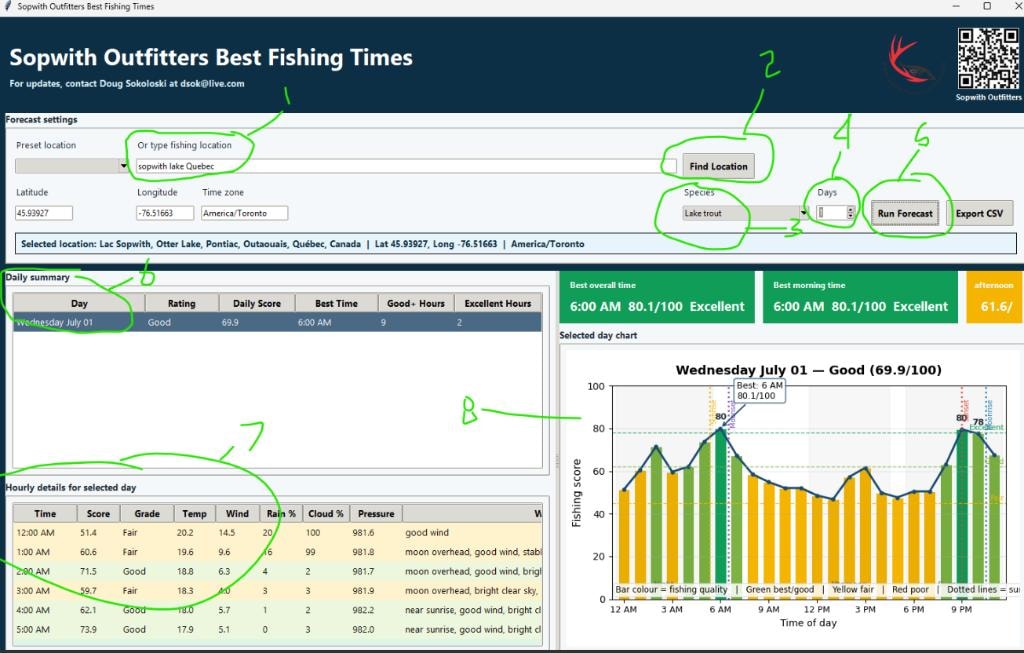
Step-by-Step Instructions
Set Your Fishing Location
In the Preset Location field you will see it is already set to Sopwith Lake, Quebec. If you are fishing somewhere else, simply type the new location in the field.
Find Location
Click the Find Location button. The program will load the current weather data, moon phases, and solunar tables for your chosen location.
Choose Your Fish Species
Use the Species dropdown to select the type of fish you are targeting — for example Lake Trout or Speckled Trout.
Select the Number of Days
Pick how many days you want the program to forecast. 1 to 3 days is recommended — weather always changes, so shorter forecasts are more accurate.
Run the Forecast
Click the Run Forecast button. The program is currently set for a 1-day forecast by default.
Review Hourly Conditions
The hourly details table shows every hour of the day along with temperature, wind speed, rain %, cloud cover, and pressure. This is especially useful for checking wind — avoid going out when winds are forecast at 30 km/h or more. Note: the table starts at 12:00 midnight, so scroll through to find your preferred fishing window.
Read the Fishing Score Graph
The bar chart on the right shows a fishing quality score for each hour of the day. Green bars indicate the best fishing times, yellow is fair, and red is poor. Use this at a glance to plan exactly when to be on the water.
Ready to Try It?
Once you have reviewed the steps above, download the program and start planning your perfect fishing day.
Download the Program